Editor
One ES module with its styles included. It works with any framework or none, takes flow JSON in and gives flow JSON back, and never assumes your steps — the palette, the forms and the validation all come from the registry you pass. The editor carries no branding: its default look is neutral grey with system fonts, and every colour, font, radius and string is an option.
Playground
One editor, running the standard steps in this page. Each switch changes its options in place — what editor.setOptions() does — so the canvas, the selection and the undo history survive. The code under it is the exact set of options that
produces what you see.
Loading the editor…
The options that produce what you see — only the ones that differ from the defaults:
createEditor('#editor', {
	steps: standardRegistry,
	flow,
	ui: { inspector: false }
});
Test run really calls the GitHub API: the HTTP step sends GET and HEAD requests in test runs and only pretends
for the others. After a run, switch the inspector on, click a step and open Input or Output. On a phone the editor is already in its one-column
layout; on a wide screen, pick 420px to see it fold. Look sets theme.colors, radius and, for Serif, fontFamily.
Mounting
<div id="editor" style="height: 100dvh"></div>

<script type="module">
	import { createEditor } from '@arcsig-labs/editor';
	import { standardSteps } from '@arcsig-labs/nodes';

	const editor = createEditor('#editor', {
		steps: [standardSteps],
		theme: 'auto',
		onChange: (flow) => localStorage.setItem('flow', JSON.stringify(flow))
	});
</script>
The container needs a height; the editor fills it. Svelte is an optional peer dependency — only the /svelte entry needs it installed, because
the default entry has Svelte compiled in. Create the editor once and push later changes through setOptions: recreating it costs the canvas, the
selection and the undo history. steps is the one option fixed for the life of an instance.
Options
Sixteen options. Everything except steps, backend and the callbacks is plain JSON.
| Option | |
|---|---|
steps | A registry from createRegistry, or packs and step definitions. Fixed for the life of the instance. |
flow | Flow JSON (object or string) to show. A different object reloads the canvas; positions are optional. |
theme | 'light' | 'dark' | 'auto', or mode, colors, light, dark, fontFamily, monoFontFamily, fontSize, radius, nodeWidth. Default auto. |
ui | Parts of the interface: toolbar, palette, inspector, testRun, json, importExport, flows, executions, ai, controls, minimap, background, attribution, node. A flag hides interface, not behaviour. |
labels | Replace or translate any of the 151 interface strings. |
readonly | View only: no adding, moving, connecting or editing. |
storageKey | Autosave to localStorage under this key and restore on load. |
services | Handed to steps during a Test run in the browser. |
vars | Run variables for the editor's runs, never written into the flow. |
summaries | Replace what a step says it will do on the canvas, by kind. |
runStepDelay | Pause between steps in a Test run, so it is watchable. Default 450 ms. |
backend | A flow server: open, save, activate, run for real, browse past runs. |
onChange | The flow after every edit (debounced). |
onValidate | The problems whenever they change, and once on load. |
onSelect | The selected step id, or null. |
onRun | Each Test run event. |
createEditor returns a handle:
editor.getFlow();                  // Flow
editor.getIssues();                // Issue[]
await editor.setFlow(json);        // { loaded, issues }
editor.setOptions({ theme: 'dark', readonly: true, labels: { testRun: 'Dry run' } });
editor.undo();
editor.redo();
await editor.run();                // Test run: simulated
await editor.runOnServer();        // with a backend: the real thing
editor.destroy();
The Svelte component takes the same options as props, plus one of its own: brand, a snippet for the left of the toolbar. Its methods
(getFlow, getIssues, load, run, undo, …) are reached through bind:this.
Test run and Run
Test run runs the flow in simulate mode: a step that defines a simulate handler reports what it would do instead of doing it. A step without one runs its normal code — that is what makes a test run useful for conditions, set-fields and your
own pure steps — so the run log says “Simulated — steps without a test mode still run” rather than promising that nothing happened. Give any step
that sends, pays or writes a simulate handler.
Run exists in server mode only: it saves the flow and runs it on the server for real. The log is titled Run, says “Ran on the server”, and wears the live colour, so a real run never looks like a rehearsal. The log docks under the canvas rather than
over it and follows the newest event unless you have scrolled up.
A flow started by a webhook or a schedule has no payload when you press either button. Give the trigger a Test body (sample)
and both runs start from it, so {{ trigger.body.total }} resolves to something.
Run data
After a test run, each step's Input and Output are there as a JSON tree — per loop iteration too. Drag any value onto a
field to insert the expression for it, or type {{ in a field to pick from what actually ran, with a live preview underneath. Try it in the playground: press Test run, select Is it up? and open Input — that is the GitHub API's answer, which its code reads as input.status.
Run variables and summaries
vars hands the editor the host's numbers for its runs, readable as {{ vars.balance }}. They are merged in when a run starts —
over the flow's own vars, which are over the step pack's sampleVars — and never written into the flow you save. summaries replaces the line a step shows on the canvas, by kind; the step's own summary stays the fallback, and a summary that throws falls
back to it. Switch the balance, press Test run, and a different branch runs.
Loading the editor…
createEditor('#editor', {
	steps: standardRegistry,
	flow,
	vars: { balance: 2400, currency: 'USDC' },
	summaries: {
		'logic.if': (config) => `Balance over ${config.conditions[0].right}?`
	}
});
Your own header
A host with a header of its own usually wants the canvas without a second name field. ui.toolbar takes true, false, or the parts to keep: name, status, undo, note, json, importExport, flows, executions, run and testRun. A part that has a ui option
of its own shows when both are on. Once name is off and no labelled button is left, the toolbar shrinks from 56px to a 40px strip with the
problem badge, undo/redo and Note. Here the header and its Test run button belong to the host page:
Loading the editor…
createEditor('#editor', {
	steps,
	flow,
	ui: {
		toolbar: { name: false, json: false, importExport: false, flows: false, executions: false, run: false, testRun: false },
		palette: false
	}
});

hostTestRunButton.onclick = () => editor.run(); // hiding a button never disables what it did
In Svelte, the brand snippet stands where the name field was — pick Brand under Toolbar in the playground to see it:
<FlowEditor steps={registry} {flow} ui={{ toolbar: { name: false, testRun: false }, testRun: true }}>
	{#snippet brand()}<strong>Payouts</strong>{/snippet}
</FlowEditor>
Editing
- Hover a connection and press + to insert a step; later steps move right to make room.
- Drag a connection into empty space (or click an output) to add a connected step.
- Copy, cut and paste selections as flow JSON — pasting also accepts
{ nodes, edges }from a model, with ids and{{ steps.… }}references rewritten. - Undo and redo, duplicate, multi-select with a box (Shift-drag) or Shift/⌘-click.
- Sticky notes: Note adds one; double-click to edit, drag the corners to resize. They are saved as
annotationsin the flow JSON and ignored when it runs — the playground's flow has one. - A step that runs another flow (
flow.call, or any type that declaressubflow) opens it: the canvas swaps to the called flow and a band above it leads back out. Needs abackend, and unsaved changes stop the move rather than being lost to it.
| Shortcut | |
|---|---|
⌘Z / Ctrl+Z | Undo |
⇧⌘Z / Ctrl+Y | Redo |
⌘C, ⌘X, ⌘V | Copy, cut, paste |
⌘D, ⌘A | Duplicate, select all |
Backspace / Delete | Delete the selection |
Esc | Close the picker, clear the selection |
Shortcuts apply to the editor that was clicked last, and never while typing in a field.
Step shapes
ui.node picks how a step is drawn. All three read the same flow and keep the same handles, so switching is safe on a flow that already has
positions — try them in the playground.
card | Default. A full card: category, name, what the step will do, and any port labels inside it. |
tile | A square of icon with the name and summary underneath, and port labels beside the square. Closest to n8n. |
compact | One row — icon and name only. Fits a lot of steps on screen. |
Theming
Every colour is a --fb-* CSS variable on the editor's root, set from the theme option. colors applies to both modes; light and dark override the same names for one mode only.
createEditor('#editor', {
	steps,
	theme: {
		mode: 'auto',
		colors: { accent: '#c084fc', accentSoft: 'rgba(192, 132, 252, 0.16)' },
		dark: { background: '#0b0b10' },
		fontFamily: 'Inter, system-ui, sans-serif',
		monoFontFamily: 'JetBrains Mono, monospace',
		fontSize: 14,
		radius: 14,
		nodeWidth: 260
	}
});
Nineteen names cover the whole editor:
| Token | Paints |
|---|---|
background | The canvas, and the panels behind everything else. |
surface | Cards, inputs, menus, the run log. |
surfaceHover | Those same surfaces when hovered or active. |
surfaceActive | Steps in the minimap. |
border | Hairlines between rows and panels. |
borderStrong | Outlines of cards, inputs and buttons. |
text | Ordinary text. |
textSoft | Secondary text: summaries, values, port labels. |
textMuted | Labels, hints, timestamps, the category above a step's name. |
accent | Selection, focus rings, step icons, running edges, run state. |
accentSoft | The translucent ring and glow behind accent. |
primary | The main button — Test run, Apply. |
primaryText | Text on that button. |
live | Runs that really happened: the Run log's frame, badge and rows. |
liveSoft | The translucent background behind live. |
danger | Errors: text, borders, icons. |
dangerSoft | The background behind an error. |
edge | Connection lines. |
grid | The canvas dot or line pattern. |
Text
Every string the editor can show is in labels — 151 of them, from button captions to the empty-canvas hint to validation wording. Pass the ones
you want to change and the rest keep their defaults; {name} and {count} placeholders are filled in at render time. An empty
string drops the optional ones, such as the hints on an empty canvas. Step titles, descriptions and field labels are not in labels: they come
from your step definitions, which is why they stay English when you pick Deutsch in the playground.
import { defaultLabels } from '@arcsig-labs/editor';

Object.keys(defaultLabels); // every string, with its default

createEditor('#editor', {
	steps,
	labels: { testRun: 'Çalıştır', searchSteps: 'Adım ara', emptyTitle: 'Bir tetikleyiciyle başla' }
});
Small containers
The layout follows the width of the editor's own container, not the window, so an editor in a side panel behaves like one on a phone. Below about 820px it becomes one column — the canvas with the open panel under it, the step list behind an Add step drawer, and the toolbar's secondary actions behind More. Below about 560px buttons keep their icons and drop their words. Nothing is removed; it folds, and stays usable down to about 400px. The playground's 420px switch shows it.
Height
The editor fills its element, so that element needs a definite height — one the browser can resolve without measuring the content. A development build writes one console warning when the height came from the content.
#editor { height: 100vh; }          /* or a px height, or height: 100% inside a sized parent */
.column { display: flex; flex-direction: column; min-height: 100vh; }
.column #editor { flex: 1; min-height: 0; }   /* min-height: 0, or the palette grows the row */
Svelte Flow attribution
The canvas carries a small “Svelte Flow” link in its corner. It belongs to Svelte Flow, the canvas library underneath,
and showing it is a condition of using that library for free — so arcflow has no option to hide it. ui.attribution moves it to another corner
(default 'bottom-right') and --fb-attribution-offset sets its distance from the edge.
createEditor('#editor', { steps, ui: { attribution: 'bottom-left' } });

/* and, in your stylesheet, how far it sits from the canvas edge */
.fb-root { --fb-attribution-offset: 14px; }
Server mode
This part needs a running server, so it cannot be live on this static page. Give the editor a backend and the toolbar grows a flow list with Save and Activate, an Executions panel with run history, a credential picker, and a Run button that runs on the server and streams events onto the canvas. It opens the flow saved last, saves a flow with errors as a draft (only Activate insists on no errors), and asks the server what it has configured so missing features are off rather than failing when pressed.
import { createEditor, createHttpBackend } from '@arcsig-labs/editor';

createEditor('#editor', {
	steps,
	backend: createHttpBackend('http://localhost:8787', { apiKey })
});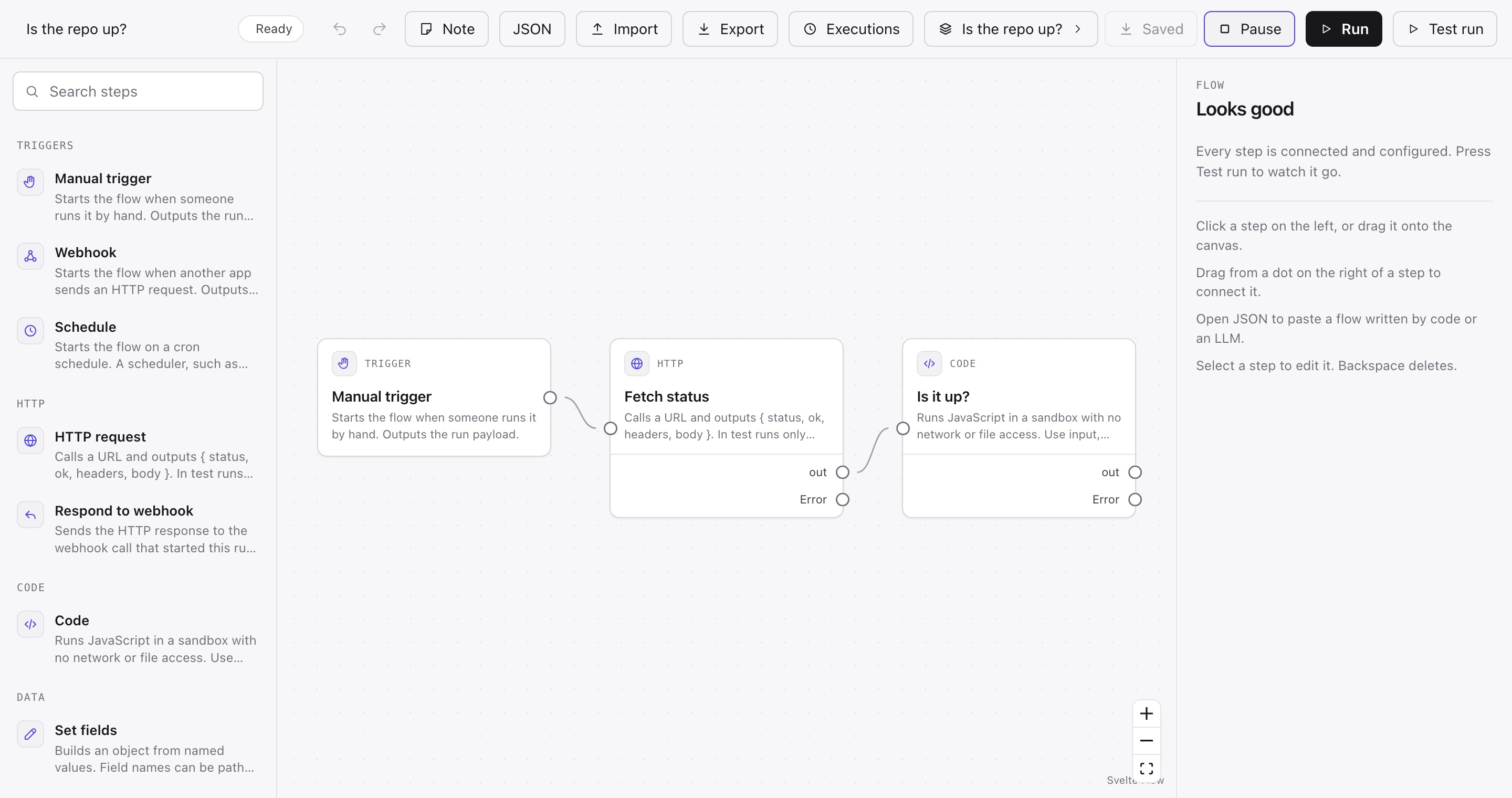
arcflow dev with one active flow and two past runs.To try it on your machine, run the server and open http://127.0.0.1:8787:
ARCFLOW_SECRET="a long random string" npx -y -p @arcsig-labs/server -p @arcsig-labs/editor arcflow devSee Server for the API behind it.
Prompt bar
The prompt bar needs a server with a model configured — an Anthropic API key on the server, never in the browser — so it does not appear on this page, and
a server without a key shows no bar at all. With one, describe a flow and it is built and validated on the canvas; describe a change and it is applied to
the open flow. Either way the result lands with Keep and Discard, on top of the normal undo history. With errors on the
canvas the bar offers Fix problems, handing the model the issues and their paths; otherwise it offers Explain. ui.ai: false hides it.
ANTHROPIC_API_KEY=sk-... ARCFLOW_SECRET="a long random string" npx -y -p @arcsig-labs/server -p @arcsig-labs/editor arcflow devSee AI and agents for the generate, edit and repair loop behind it.